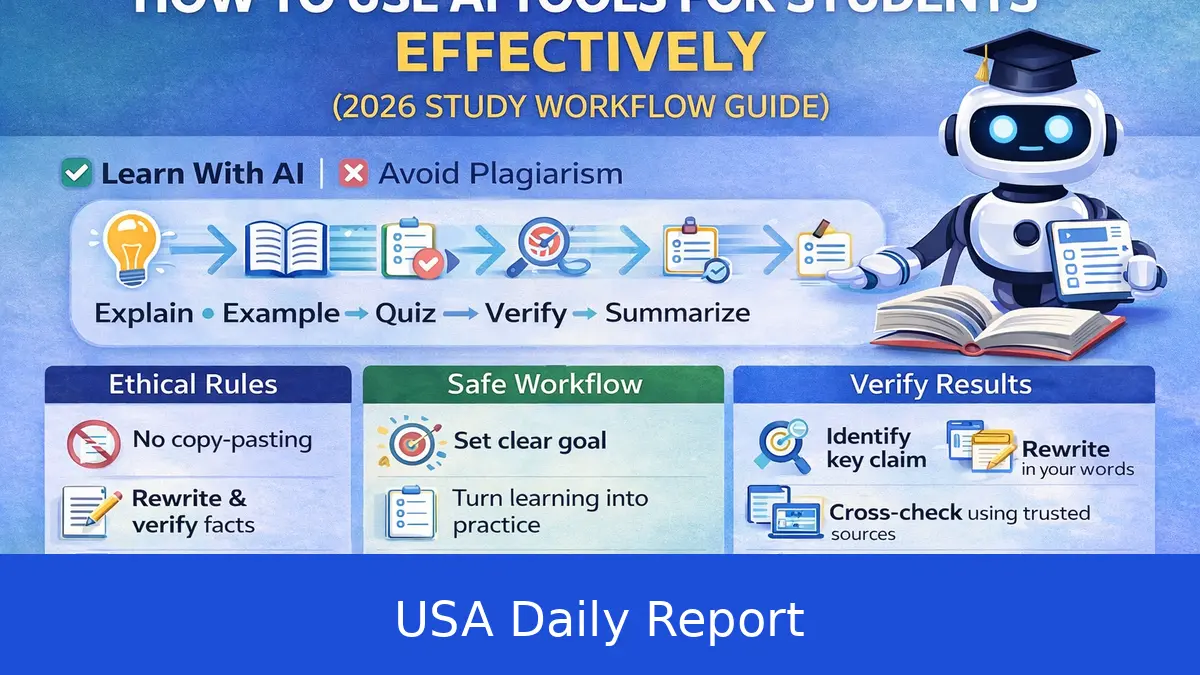
AI is becoming a daily tool for students across the US. From middle school to college, more students are using AI to help with homework, study smarter, and manage their schoolwork. This guide breaks down how to get started, step-by-step tips, and the best free options to make AI work for you.
Quick Overview of AI Tools for Students
- ChatGPT: A conversational AI that helps explain tough concepts, brainstorm ideas, and give feedback on essays. It’s widely used by students for quick answers and writing support. ChatGPT offers a free tier and a Plus plan at $20/month which provides faster responses and priority access.
- Claude: Developed by Anthropic, Claude is similar to ChatGPT but known for its safety features and ability to clarify complex ideas. It offers free access with usage limits and paid plans for heavier users.
- Google Gemini: Google’s AI assistant that provides detailed answers, research help, and study support. It integrates with Google Workspace apps, making it easier to pull in documents or notes. Google offers free access through its AI tools linked to your Google account.
- Google NotebookLM: Allows you to upload your notes, textbooks, or PDFs to get summaries, explanations, and even audio guides. This tool is free and especially handy for reviewing large chunks of material without rereading everything.
- Khan Academy Khanmigo: An AI tutor designed to guide students step-by-step without giving direct answers, promoting learning through questioning. It costs about $4 per month for students but is free for teachers, making it a great resource in classrooms and for home use.
- Photomath and Wolfram Alpha: Both specialize in math. Photomath lets you scan handwritten or printed math problems with your phone and shows step-by-step solutions. Wolfram Alpha is a powerful computational engine that can solve math problems, provide data analysis, and generate graphs. Both have free versions with optional paid upgrades for extra features.
- Quizlet AI: Enhances the classic flashcard tool by generating flashcards and quizzes automatically from your notes or textbook content. It offers a free plan with basic flashcards and a Plus plan around $4/month for AI-generated study sets and advanced features.
How to Get Started with AI for Homework
Step 1: Pick the right tool for your subject. For math homework, Photomath or Wolfram Alpha work best. For writing or history, ChatGPT or Claude are great. Science students might prefer Google NotebookLM for summarizing notes.
Step 2: Check your school’s AI policy. Many US schools updated their rules in 2023 and 2024 due to AI’s rise. Some allow AI for brainstorming and studying but forbid submitting AI-generated essays or answers on tests. Knowing the rules helps you avoid trouble.
Step 3: Create a free account if needed. Most AI tools offer free versions. Google NotebookLM and Photomath are free to start with no payment info required. ChatGPT has a free tier, and Khanmigo costs roughly $4/month for students but is free for teachers. Signing up is usually quick and only requires an email.
Step 4: Start small. Try asking an AI to explain a tricky concept in simple terms or to summarize a textbook chapter. For example, ask ChatGPT to "Explain the causes of the American Revolution in simple words." This helps you get comfortable before using AI for bigger tasks.
Step-by-Step Guide to Using AI for Homework and Studying
1. Explain Concepts
Type questions like, "What is photosynthesis? Explain it like I’m 12." The AI will break it down into simple, clear language. This works for science, history, math theories, or any subject. If you don’t understand the first answer, ask follow-up questions to dig deeper.
2. Create Flashcards
Copy-paste your notes or textbook sections into Quizlet AI to generate flashcards automatically. For example, enter a history chapter and get key terms, dates, and concepts turned into digital flashcards. Use these to quiz yourself and improve memory retention. Flashcards are a proven study method, especially for vocabulary, formulas, or historical dates.
3. Solve Math Problems
Snap a photo of a math problem with Photomath or type it into Wolfram Alpha. Both will show step-by-step solutions so you can understand how to solve similar problems later. For example, if you’re stuck on quadratic equations, these tools walk you through each calculation.
4. Get Writing Help
Use ChatGPT or Claude to brainstorm essay topics, organize outlines, or get feedback on drafts. Start by pasting your essay and asking for suggestions on clarity, grammar, or structure. Remember, schools may require your own writing, so use AI to improve, not replace, your work.
5. Summarize Notes and Textbooks
Upload your class notes or textbook PDFs to Google NotebookLM. Ask it to summarize chapters or create audio guides you can listen to on the go. This saves time and helps you focus on key points for exams.
6. Practice with Quizzes
Use Quizlet AI to generate quizzes from your flashcards or notes. Testing yourself regularly helps reinforce learning and identify weak areas. For example, after studying a biology chapter, take a quiz generated by Quizlet AI to check your understanding.
Tips and Tricks for Using AI Effectively
- Don’t rely on AI for answers during tests—this can be cheating and lead to penalties.
- Use AI to understand concepts and get unstuck, not to do your homework for you.
- Double-check AI responses, especially in subjects like history or science, because AI can occasionally make mistakes.
- Pair AI tools with your class materials to get the best results.
- Set specific questions for the AI instead of vague ones to get clearer answers. For example, ask "What are the three branches of US government?" instead of "Tell me about the government."
- Take notes on AI answers to reinforce learning instead of copying them verbatim.
- Use free versions first—most tools have enough features to help without paying.
- Check for free trials or discounts. Meanwhile for example, Khanmigo is free for teachers, so ask your teacher if they have access.
Best Free AI Alternatives for Students
- ChatGPT Free Version: Access basic AI chat and writing help at no cost. Great for essays and concept explanations.
- Google NotebookLM: Completely free for uploading notes and getting summaries or audio guides.
- Photomath: Free to scan and solve math problems with step explanations. Paid version offers extra features, but free is enough for most homework.
- Wolfram Alpha Basic: Free access to computational answers and math help, with optional paid upgrades.
- Quizlet Basic: Create and study flashcards for free, enough for most students’ needs.
- Claude Free Tier: Offers safe and clear explanations with some usage limits.
Using these free tools, you can cover most subjects without spending money. They provide a solid foundation to get comfortable with AI before deciding if paid features are worth it.
AI is a powerful study partner in 2026, but it works best when you use it smartly and responsibly. Pick the right tool for each subject, follow your school's rules, and use AI to help understand concepts, practice skills, and organize your work. Start small, experiment with free versions, and build your confidence with AI as part of your study routine.


