
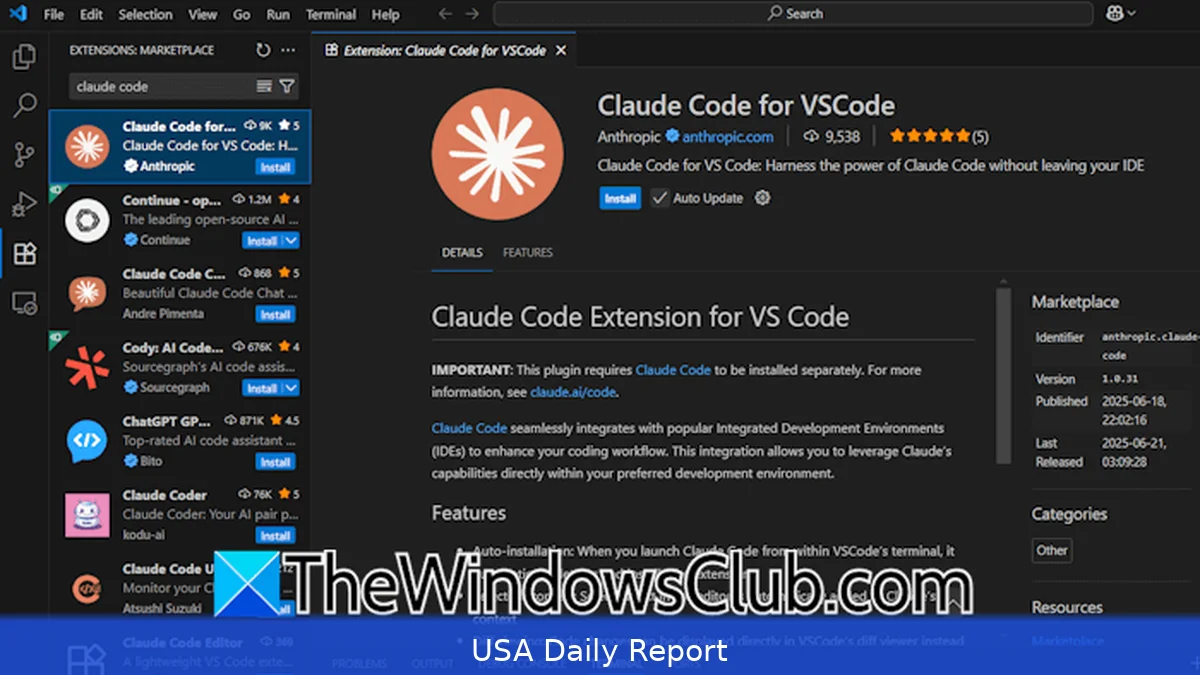
Want to use Claude Code inside Visual Studio Code so it can help you write, refactor, and run code without leaving your editor? This guide shows how to install, configure and use Claude Code with VS Code on Windows, macOS or Linux in 2026. It covers account plans, API keys, CLI ties, the VS Code extension options, Git integration, cost notes ($17/month Pro, Max from $100/month), and common mistakes to avoid.
Quick reference
- Sign up: https://www.anthropic.com/ (Pro $17/month, Max starting at $100/month as of 2026).
- Get API key from your Anthropic dashboard (Account > API keys).
- Install: VS Code extension (search "Anthropic" or "Claude Code" in Marketplace) or use the Claude CLI and integrate via VS Code terminals.
- Local requirements: VS Code 1.80+ recommended, Node.js 18+ or Python 3.10+ for CLI integrations, Git for version control.
- Useful URLs: Anthropic docs (https://www.anthropic.com/), VS Code Marketplace (https://marketplace.visualstudio.com/), USA cybersecurity guidance (https://www.us-cert.cisa.gov/) and general government services (https://www.usa.gov/).
Prerequisites
Before starting, have these ready:
1) An Anthropic account. Go to https://www.anthropic.com/ and sign up. Free access offers basic chat, but coding features and long-running agent workflows generally require a paid tier — the Pro plan is $17/month and Anthropic’s Max plan starts at $100/month (prices current in 2026).
2) VS Code installed (download at https://code.visualstudio.com/). Use the latest stable release — versions 1.80 and above work best with modern extensions.
3) Git installed (https://git-scm.com/). GitHub or other Git remotes are optional but highly recommended.
4) A terminal environment: Windows Terminal, macOS Terminal, or an integrated terminal in VS Code. Node.js (18+) or Python (3.10+) if you plan to run the Claude CLI or SDK locally.
Step-by-step: install Claude Code integration in VS Code
Here's a step‑by‑step workflow that walks through both using an extension (if one exists) and the CLI approach. Pick the one that fits your workflow.
Extension approach — easiest
1) Open VS Code. Click Extensions (<Ctrl+Shift+X> or <Cmd+Shift+X>).
2) Search for "Claude" or "Anthropic". Look for an official Anthropic/Claude extension — check the publisher name and the extension description. If you can't find an official extension, try a trusted community extension that claims to support Anthropic's APIs — but check its reviews, publisher and source before installing.
3) Click Install. After install, click the extension settings or the extension’s activation button to configure.
4) Get your API key from the Anthropic dashboard: sign in at https://www.anthropic.com/, open Account > API keys, and copy the key. Store it in your OS password manager or the VS Code secret storage — don’t paste it into source files.
5) Paste the API key into the extension’s settings. In VS Code: File > Preferences > Settings, find the extension and set the apiKey field, or open the command palette (<Ctrl+Shift+P> / <Cmd+Shift+P>) and run the extension’s "Set API Key" command.
6) Open a project folder. Most extensions scope projects by folder. Start an interaction from the command palette or by highlighting code and invoking the extension’s "Explain code" or "Refactor" command.

CLI approach — more stable and scriptable
1) Install the Anthropic SDK or CLI. If you use Python: pip install anthropic. If you prefer Node: npm i -g @anthropic/sdk (exact package names may vary; check Anthropic docs at https://www.anthropic.com/ for official CLI/SDK install instructions).
2) Authenticate the CLI: export ANTHROPIC_API_KEY="your_key_here" on macOS/Linux or setx ANTHROPIC_API_KEY "your_key_here" on Windows PowerShell. For cross-platform VS Code tasks, put the key into VS Code Secrets or use a .env file excluded from Git.
3) From the integrated terminal run a test command to verify the key works: e.g., anthropic --model=opus-4.6 --prompt="Explain this file" ./path/to/file (commands differ by CLI version—use the help flag for exact syntax).
4) You can hook the CLI into VS Code by adding a .vscode/tasks.json entry that runs CLI commands on demand or when you save a file. That makes Claude Code act like a local tool — run linting, refactors or tests driven by the model.
Common workflows
- Code generation: highlight a function you want implemented, invoke "Write function" with the desired signature and unit tests. Claude Code can produce code and suggested tests.
- Refactor & explain: select a block and ask for simpler logic, performance improvements, or inline comments.
- Test and debug: ask Claude Code to write unit tests, then run them locally with your existing test runner. Use the CLI to create test files and commit them to Git.
- Project planning: use Plan Mode (if available in your plan) to break a feature into tasks, then create issues in GitHub manually or via CLI automation.
Integrating with Git and CI
1) Treat AI-generated code like any other contribution: test it, review it, and commit in small, clear increments. Use small commits and clear messages like "AI: add initial sort util (Claude Code)".
2) Use pre-commit hooks to run linters and tests before pushing. That keeps AI output from breaking builds.
3) For CI, store API keys as secrets in your CI system (GitHub Actions secrets, GitLab CI variables). Never hard-code keys in repos.
Costs, billing and eligibility
Anthropic billing is handled through your account dashboard. In 2026, the Pro plan is $17/month and the Max plan starts at $100/month — Pro is fine for light to moderate coding help; expect heavier agentic workflows and long-run sessions to need Max. Keep an eye on usage in your Anthropic dashboard so you don't get hit with unexpected charges. If you're using a team or organization account, Anthropic supports organization seats and centralized billing — check the account settings for invoicing options.
For public sector organizations or federally funded projects, check agency procurement rules and cybersecurity guidance at USA.gov (https://www.usa.gov/) and the Cybersecurity & Infrastructure Security Agency (CISA) at https://www.cisa.gov/ for approved practices on handling API keys and data sharing.
Tips
- Keep the model context small for fast responses. Send only the files or snippets the model needs.
- Use explicit prompts: say which language, style guide, or runtime you target — "TypeScript, Node 20, CommonJS" — to avoid back-and-forth edits.
- Save generated code to a new branch. That makes review easier and protects main branches.
- Auto-accept edits only after you’ve reviewed them. Some tools have "Auto Accept Edits" — turn it off until you trust the workflow.
- Use local linters and formatters (ESLint, Prettier, Black) as an automatic gate.
Alternatives and brief comparisons
- ChatGPT / OpenAI: widely used, many VS Code integrations, often similar cost tiers. If your team already uses OpenAI, check ecosystem compatibility.
- Codeium, GitHub Copilot: focused on inline completions and IDE integrations. Copilot pricing and enterprise plans differ — Copilot Business and Enterprise may be preferable for GitHub-heavy workflows.
- Local LLMs: run models locally if data confidentiality matters. They avoid API fees but need powerful hardware and maintenance.
Common mistakes to avoid
1) Committing API keys or .env files. Always add secrets to .gitignore and use secret managers.
2) Assuming every AI suggestion is production-ready. Run tests and review for security issues — AI can introduce vulnerabilities or design smells.
3) Running large-scale agent tasks on the free plan. The free tier limits long-lived or agentic sessions — expect to upgrade to Pro or Max for heavy use.
4) Not tracking costs. Enable usage alerts in your Anthropic account so you don’t get surprised by a big bill.
5) Using default prompts forever. Tune prompts and system instructions for your codebase for more predictable output.
Related Articles
Claude Code can sit nicely inside VS Code if you pick the right integration: extension for quick access, CLI for stability and automation. Sign up at https://www.anthropic.com/, grab an API key, and choose Pro ($17/month) or Max (from $100/month) depending on usage. Use branches, linters and CI secrets so AI output stays safe and reviewable. For government or regulated work, follow guidance at USA.gov and CISA to protect data and keys.
This article was created with AI assistance.


